The ESG QuickStretch Wizards let you "one click" to apply a variety of contrast
enhancements to an image or mosaic of images. This is fast way to instantly
try various enhancements without having to cycle through the transforms and apply them to each layer.
All active Red, Green, Blue, Pseudo or Intensity layers in the current
algorithm surface are affected. The wizards do not affect Hue, Saturation,
Height, Classification or Class Display layers. They also do not affect
Intensity layers when sun shading is turned on. If the surface is a mosaic
of images, the enhancement is applied to all images in the mosaic. Only the
post-formula transforms are affected (not pre-formula).
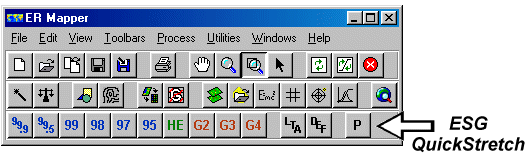

|
99.9% linear clip applies a 99.9% contrast stretch to images in the current surface. | 
|
99.5% linear clip applies a 99.5% contrast stretch to images in the current surface. | 
|
99% linear clip applies a 99% contrast stretch to images in the current surface. | 
|
98% linear clip applies a 98% contrast stretch to images in the current surface. | 
|
97% linear clip applies a 97% contrast stretch to images in the current surface. | 
|
95% linear clip applies a 95% contrast stretch to images in the current surface. | 
|
Histogram Equalize applies a histogram equalization contrast stretch to images in the current surface. | 
|
Gaussian Equalize 2 applies a Gaussian equalization (2 standard deviations) contrast stretch to images in the current surface. | 
|
Gaussian Equalize 3 applies a Gaussian equalization (3 standard deviations) contrast stretch to images in the current surface. | 
|
Gaussian Equalize 4 applies a Gaussian equalization (4 standard deviations) contrast stretch to images in the current surface. | 
|
Set Limits to Actual sets final (post-formula) transforms for images in the current surface to the actual input limits and a default transform line. | 
|
Reset Default Transforms resets final (post-formula) transforms for images in the current surface to the default 0-255 input range and a default transform line. It also restores final transforms if they have been deleted for layers. | 
|
Set QuickStretch Preferences lets you control the default behavior of the other "one-click" wizards. This includes:
|